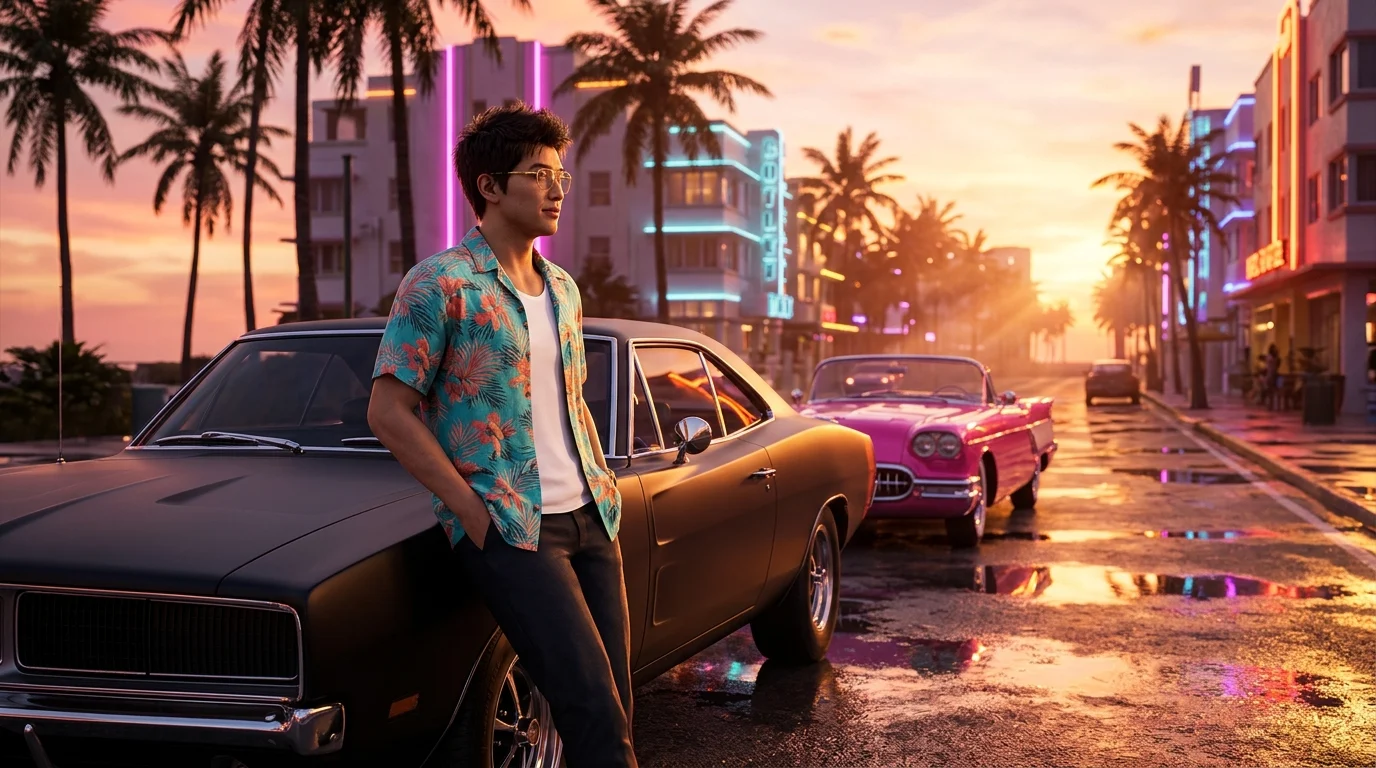
Vice City Studio · 1080p + Native Audio

GTA 6 Style AI Video Generator

Upload one portrait and a game clip to put yourself straight into Vice City cutscenes, HUD gameplay, and neon street action.

Native Audio
1080p
HUD & Scene Lock
Video Swap
9:16 & 16:9
4–30s
Fights & Chases
Action Ready

Live Browser Studio

Create Your GTA 6 Style Video Right Here

Switch to Image & Reference mode below, upload your portrait under Reference Images and an optional 4–30s game clip under Reference Videos, then paste or customize a Vice City-style prompt. MAGI-2 renders natively in 1080p with synchronized audio.

Ready-to-Use Prompts

Copy a Tested GTA-Style Prompt

Paste directly into the prompt box above and adjust outfit or camera notes.

Reference Swap9:16

Sunset Cutscene Protagonist Swap

Keep the exact sunset Vice City boulevard, vintage muscle car, neon signs, car door slam, and backward tracking camera from the reference video. Replace the main character with the person from the reference image, matching their exact face, hair, and outfit in photorealistic next-gen open-world game lighting. Include V8 engine rumble, door slam, and ocean boulevard ambience.

Gameplay + HUD16:9

Third-Person Street Walk with Minimap

Preserve the third-person over-the-shoulder gameplay camera, golden-hour Miami sidewalk, pastel art-deco hotels, pedestrians, pink convertible sports car, bottom-left minimap radar HUD, and top-right cash counter from the reference video. Replace the player character with the person in the reference image rendered in crisp real-time next-gen game engine shaders.

Street Action16:9

Neon Alley Martial Arts Showdown

Photorealistic next-gen open-world action video game footage on a rain-slicked neon Miami street at dusk. Dynamic handheld tracking camera orbits two stylish action fighters trading fast martial-arts blocks, spinning kicks, and dodge rolls beside a glowing cyan coupe as magenta reflections splash in puddles. Stylized impact camera shake, crisp strike whooshes, and synthwave bass.

Loading Screen16:9

Animated Vice City Poster Loop

Use the person in the reference image as the centerpiece of a bold comic-ink illustrated Vice City game loading screen coming alive in smooth 2.5D parallax motion. Saturated tropical magenta-and-gold sunset skyline, swaying palm silhouettes, classic turquoise convertible, crisp cel-shaded outlines, slow cinematic push-in, warm retro synthwave groove.

Tested Reference-Video Swaps

See Real Before & After Character Replacement

Both pairs below were generated end-to-end on the same MAGI-2 1080p pipeline available in the studio above—combining one reference portrait with a 6-second reference clip, with zero manual rotoscoping or green-screen compositing.

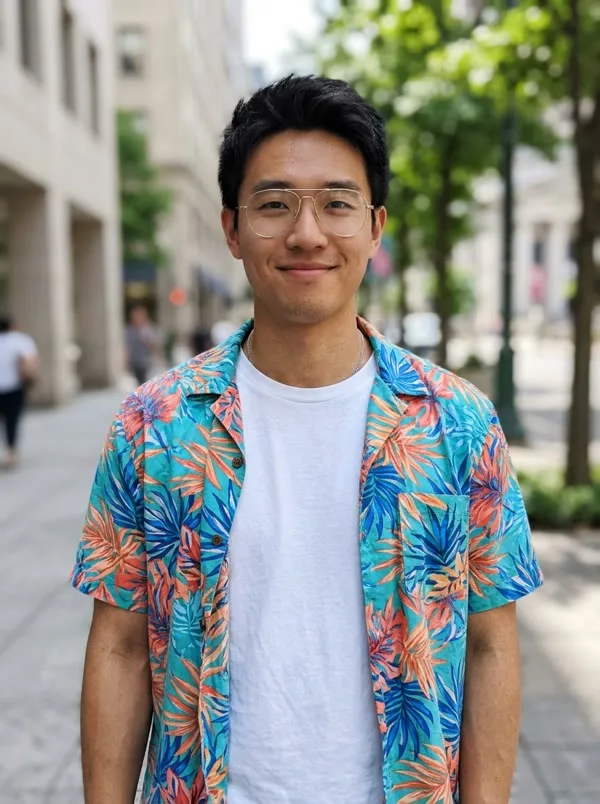
Reference daylight portrait of a fictional young man wearing gold aviator glasses and a turquoise-and-coral Hawaiian shirt

Single Input Portrait Used Across Both Tests

One Casual Daylight Photo → Full Next-Gen Game Character

A single waist-up casual photo (short black hair, thin gold aviator glasses, turquoise-and-coral Hawaiian shirt over a white t-shirt) was supplied alongside each source video. MAGI-2 automatically relit skin, glasses, and fabric under golden-hour and neon reflections to match the game engine look.

Test 01 · Front-Facing Cutscene Swap

Stepping Out of a Muscle Car on a Neon Sunset Boulevard

MAGI-2 · 1080p · 9:16 · 6s · Native Audio

Even while seated behind the windshield glass, opening the heavy driver door, and walking into a tight close-up, MAGI-2 locked the matte-black muscle car, rear license digits, palm silhouettes, neon motel signs, and backward tracking camera while replacing the bearded hoodie character with our portrait subject—and naturally transferring the confident smirk into the new face.

01 · Source Reference Video

02 · MAGI-2 1080p Swapped Output

PromptKeep the exact sunset Miami Vice City boardwalk, pink-and-orange sky, neon motel signs, matte-black vintage muscle car, car door opening and closing action, backward-tracking camera movement, and confident walk toward the camera from the reference video. Completely replace the bearded man in the grey zip-up hoodie with the young East Asian man from the reference image: keep his exact face, short textured black hair, thin gold-rimmed aviator glasses, confident half-smile, silver chain, and unbuttoned bright turquoise-and-coral tropical Hawaiian shirt over a crisp white t-shirt, rendered seamlessly in the same photorealistic next-gen video game cutscene lighting and shaders. Keep the car door slam, idling V8 engine rumble, footsteps, and coastal ambience.

Test 02 · Third-Person Gameplay & HUD Swap

Over-the-Shoulder Open-World Gameplay with Minimap HUD

MAGI-2 · 1080p · 16:9 · 6s · Native Audio

Third-person gameplay footage is the toughest test for reference video models because UI overlays and NPC crowds usually warp during regeneration. Here MAGI-2 kept the bottom-left radar minimap, top-right cash indicator, passing pedestrians, pastel art-deco hotels, and parked pink convertible intact while cleanly swapping the blonde leather-jacket protagonist into our Hawaiian-shirt player character.

01 · Source Reference Video

02 · MAGI-2 1080p Swapped Output

PromptKeep the exact open-world Miami street environment, pastel art-deco hotels, golden-hour sunset lighting, pink convertible sports car, pedestrians, bottom-left minimap radar HUD, top-right green cash HUD, third-person over-the-shoulder gameplay camera movement, and walking/jogging trajectory from the reference video. Completely replace the blonde player character in the black leather jacket with the young East Asian man from the reference image: short black hair, thin gold-rimmed glasses, wearing the bright turquoise-and-coral tropical Hawaiian shirt unbuttoned over a white t-shirt and dark jeans, rendered naturally in the same next-gen real-time video game engine shaders and lighting. Keep realistic footsteps and Miami street ambience.

More Viral Open-World Formats

Street Action Choreography & Illustrated Loading Screens

Beyond protagonist replacement, creators use this studio for neon action sequences, stylized martial arts encounters, vehicle stunts, and classic animated Vice City loading screens—all from text or portrait references.

Action & Combat

Rain-Slicked Neon Street Action & Martial Arts

Choreograph dynamic street brawls, spinning kicks, parkour escapes, and vehicle showdowns with handheld camera movement, wet neon reflections, water splash physics, and punchy impact audio—without over-strict action filters blocking cinematic fight choreography.

Photorealistic next-gen open-world action video game footage at dusk on a rain-slicked neon Miami alley. Dynamic handheld tracking camera circles two agile action heroes in streetwear trading fast, choreographed martial-arts blocks, spinning kicks, and cinematic dodge rolls beside a parked glowing cyan sports coupe as neon reflections ripple in puddles. Dramatic magenta and amber rim lighting, sparks of water spray, stylized impact camera shake, realistic martial arts whooshes, tire screech in distance, pulsing synthwave bass.

Poster-to-Video Trend

Vice City Comic-Ink Loading Screen Animation

Recreate the classic GTA loading screen trend in one pass: generate or upload a bold illustrated character portrait and animate hair, palm fronds, coastal horizon parallax, and slow camera push-in with retro synthwave atmosphere.

Bold comic-ink illustrated Vice City game loading screen artwork smoothly coming to life in slow parallax 2.5D motion. A cool stylish woman in retro tinted sunglasses and a neon coral jacket leans against a classic turquoise convertible under towering palm silhouettes and a glowing magenta-gold Miami sunset skyline. Crisp cel-shaded outlines, saturated tropical halftone colors, hair and palm fronds swaying gently in warm ocean breeze, slow cinematic zoom-in, smooth lo-fi synthwave coastal groove.

How It Works

Put Yourself in Game Footage in Three Steps

No 3D modding, Unreal Engine plugins, or manual masking required. Everything runs directly in your browser.

01

Upload a Clear Portrait + Reference Clip

Pick one sharp, well-lit portrait (waist-up or front-facing selfie works best for face and outfit fidelity) and optionally upload a 4–30 second reference video clip whose camera movement, scene, or HUD you want to inherit.

02

Describe What Stays & Who Gets Replaced

Tell the model explicitly what to lock from the source video (cars, neon street, minimap HUD, camera tracking, actions) and describe the replacement character's hair, glasses, outfit, and next-gen game-engine lighting.

03

Generate 1080p Video with Native Audio

Choose 9:16 for TikTok/Reels or 16:9 for YouTube gameplay clips, select 4–30 seconds, and render with synchronized street ambience, car audio, footsteps, or action sound effects.

Measured Model Comparison

MAGI-2 vs Seedance 2.5 Flash for Game Character Swaps

We tested both models available on magi-2.run on the exact same 6-second Vice City cutscene and gameplay clips. Pick based on whether you prioritize native 1080p sharpness and lower credit cost or faster turnaround.

MetricMAGI-2 (Reference Mode)Seedance 2.5 Flash (Edit Mode)
Native Output Resolution1080p (25 fps) — crisper skin, hair & chrome720p (24 fps) — clean for vertical mobile clips
Scene & Game HUD LockNear pixel-locked cars, neon signs, minimap HUD & cameraNear pixel-locked scene, HUD & exact motion timing
Character Identity & ExpressionHigh face fidelity + natural expression transfer from source clipVery strict 1:1 photo likeness and accessory retention
Measured 6s Render Time3–16 min depending on upstream 1080p queue loadConsistent ~100 seconds (under 2 minutes)
Credit EfficiencyFlat 2.8 credits/sec (no extra input-video surcharge)Billed on input + output video duration
Best Use CaseFinal hero cuts, 1080p showcase reels, expressive close-upsRapid creative iteration & testing multiple gameplay angles

Action & Fight Scenes

Tuned Moderation for Fictional Combat & Stunts

Open-world game videos naturally include martial arts duels, street chases, action choreography, and dramatic stunts. Our pre-submit prompt filter is tuned to allow non-graphic fictional action and fighting prompts while continuing to block explicit adult content, self-harm, hate speech, graphic gore, and real-world harm.

Independent Studio Notice

Fan-Style Creative Tool — Not Affiliated with Rockstar Games

magi-2.run is an independent AI video workspace and is not affiliated with, endorsed by, or connected to Rockstar Games, Take-Two Interactive, or the developers of MAGI-2. For public social posts, use original or user-owned clips and describe "GTA 6 style" or "Vice City style" aesthetics without official game logos or trademarked character likenesses.

What Changed

  • Unlocked reference video uploads (up to 5 clips, 2–30s) directly inside MAGI-2 1080p generation, launched this GTA 6 Style AI Video Generator page with tested before/after swap showcases, and relaxed pre-submit moderation so non-graphic fictional fighting and street action prompts pass cleanly.

Frequently Asked Questions

GTA 6 Style AI Video FAQ

Practical answers on reference-video character swapping, action prompts, resolution, credits, and safe social sharing.

How do I put myself into GTA 6 style game footage?

Open the generator above in Image & Reference mode, upload one clear waist-up portrait of yourself (or an original character) under Reference Images, upload a 4–30 second gameplay or cutscene clip under Reference Videos, and write a prompt telling MAGI-2 to preserve the environment, camera movement, and HUD while replacing the protagonist with the person in your photo.

Which camera angles give the most realistic character swap results?

Front-facing or three-quarter shots where the character steps out of a car, turns toward the camera, or walks down a sunlit neon street produce the highest viral impact because viewers immediately recognize your face. Pure rear-view third-person gameplay clips also work well for outfit, hair, and HUD continuity, especially when the character glances sideways.

Can I generate street fights, martial arts, and car chase scenes without getting blocked?

Yes. Non-graphic fictional fighting, martial arts choreography, parkour escapes, and vehicle chases are allowed by our pre-submit prompt filter. Explicit sexual content, graphic gore, hate speech, self-harm, and real-world illegal weapon instructions remain strictly blocked, and upstream model providers also apply their own safety rules.

Should I use MAGI-2 or Seedance 2.5 Flash for reference video swaps?

Use MAGI-2 when you want native 1080p sharpness, expressive facial animation, and flat per-second pricing (2.8 credits/sec with no input-video surcharge). Choose Seedance 2.5 Flash if you want faster ~100-second turnaround at 720p while testing different source clips and prompts.

Does MAGI-2 keep the game minimap HUD and original sound style?

In our real-world tests, explicitly instructing MAGI-2 to keep the bottom-left minimap radar HUD, top-right cash counter, street layout, and vehicles preserved them reliably across 6-second 1080p renders. Native audio is synthesized to match the scene—including car door slams, V8 engine rumble, footsteps, and neon street ambience—rather than splicing raw copyrighted audio.

Can I try this for free before subscribing?

Yes. New accounts receive 10 welcome credits with no credit card required, enough to render one watermarked 1080p MAGI-2 video up to 5 seconds with native audio. Paid plans unlock watermark-free 1080p videos up to 30 seconds and full access to all video models.

What portrait photo works best for character consistency?

Use a sharp, evenly lit photo where your face, hairstyle, glasses, and clothing are unobstructed and clearly visible from the waist up. Distinctive outfits—like a colorful tropical shirt, leather jacket, or retro sunglasses—make the swap instantly recognizable even in wide third-person gameplay shots.

Are videos generated here safe from copyright takedowns on TikTok or X?

All showcase clips on this page are 100% original AI-generated scenes without official Rockstar logos, copyrighted trailer footage, or trademarked characters. When publishing your own videos, avoid uploading official game trailers or official logos, use original or self-recorded clips, and label your style as "GTA 6 style" or "Vice City style".

Step Into Your Own Vice City Scene

Upload a portrait and a reference clip—or start from a Vice City prompt—to render crisp 1080p open-world video with synchronized audio in minutes.